Music Assistant 2.10: Turn up the fun
Music Assistant 2.10 is here! A polished new player bar, smarter queues, a built-in music quiz and your very own AI Radio DJ. Press play ▶️
Grab your air guitar and warm up those vocal cords, because Music Assistant is back with version 2.10! 🎸 Over the past three months, we’ve been jamming with the community on a release that’s all about playing – smoother controls, smarter queues, and a full-blown game night built right into your speakers.
You might have noticed this release is a little early this time around. That’s because we’re gearing up for our first-ever booth at IFA Berlin (September 4 to 8), and wanted to share 2.10 with you before we hit the road. If you’re heading to the show, come find us at stand 153 in the Smart Home Hall – we’d love to say hi!
As always, there’s far more packed into this release than one blog can hold, so consider this the greatest hits. For the full discography, check the release notes at the end and let us know your favorite features in the comments. Kicking off the setlist: a new way to play…
“I’ve Got the Power”
Section titled ““I’ve Got the Power””A redesigned player bar

Select, group, and turn it up 🎚️
Controlling your players should feel as effortless as tapping your foot to the beat. In 2.10, the player bar has been upgraded and simplified, now built around three clear actions: select your player, group your speakers, and change the volume. No more hunting through menus – the controls you reach for most are now front and center on desktop and mobile, with responsive floating controls for grouping and volume by @erioldoesdesign and @marcelveldt.
Developing this feature was a great example of building in the open. The idea started as a Figma design that we shared with the community early in the process. We gathered feedback during the design phase, and refined together before a single line of code was written. The result is a player bar shaped by the people who actually use it, for a smoother day-to-day listening experience. And we didn’t stop there… Cue: smarter shuffling.
“Everyday I’m Shufflin’”
Section titled ““Everyday I’m Shufflin’””Queue improvements and Smart Shuffle
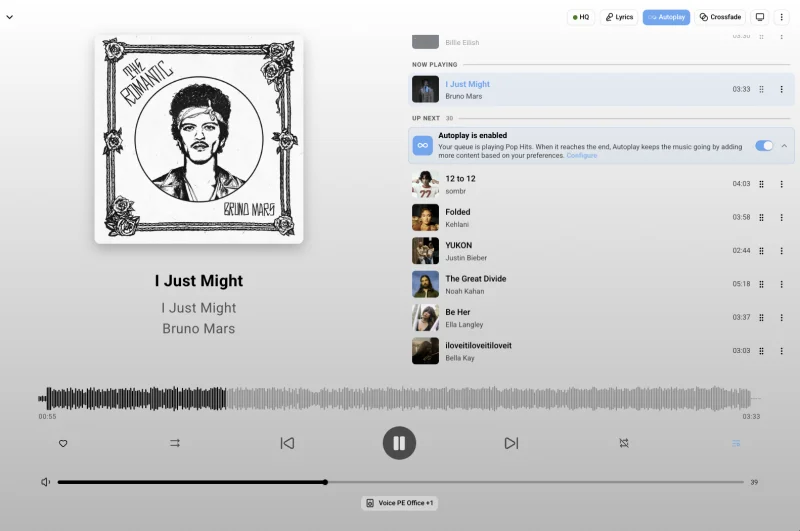
Keep the music flowing, straight from your queue.
The queue got a serious tune-up in 2.10 with two features that keep the music flowing long after your playlist runs dry.
First up: Autoplay is now fully configurable. When your queue reaches its final track, Music Assistant can keep the music playing with similar songs, a mix from your own library, or a playlist of your choosing. And because library mode works entirely offline, you no longer need a streaming provider to enjoy endless music.
Then there’s Smart Shuffle, which fixes the age-old annoyance of hearing the same songs “randomly” played on repeat 🙃 Smart Shuffle uses your listening history to push recently played tracks to the back of the queue to keep things fresh. It can also handle multiple sources at once: queue two albums and two playlists together, and Smart Shuffle grabs tracks from all of them on the fly, mixing as it goes instead of building one enormous queue up front. Both features come courtesy of @marcelveldt.
Best of all, you no longer need to dig through settings to use them: Smart Fades and Autoplay can now be toggled directly from the queue screen. A single tap gets the music mixing, and Sendspin’s making sure no one else can reach your stream…
“U Can’t Touch This”
Section titled ““U Can’t Touch This””Stop, Sendspin time
Sendspin is approaching its official v1 release, with the last big hurdle now behind us thanks to @arturpragacz. Your music can now travel encrypted from Music Assistant to your speakers, keeping it for your ears only.
It also works in reverse: any Sendspin device can now stream audio into Music Assistant, which then distributes it to your other speakers. So a turntable in the living room, for example, could stream to any speaker in the house. While no device supports this yet, Music Assistant has everything ready for the first one that does. Speaking of putting pieces in place, fancy a feature that turns your tracks into a game?
“You Puzzle Me”
Section titled ““You Puzzle Me””Where trivia meets your music
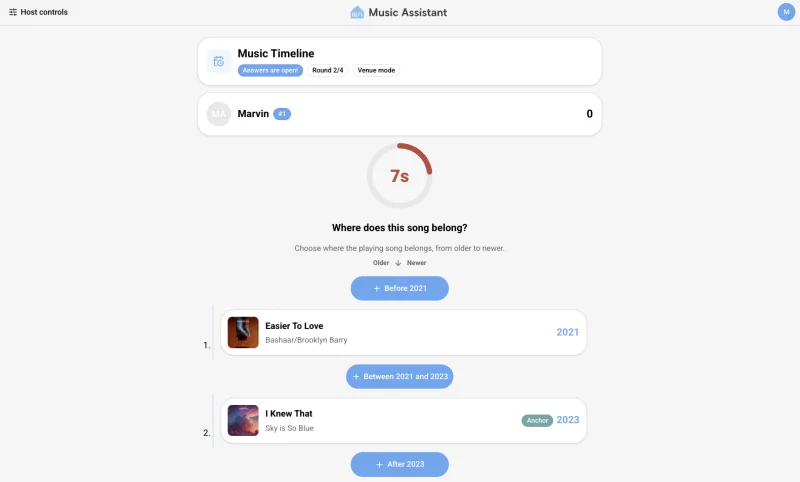
Game night just got an upgrade.
Think you know your music? Time to prove it 😏 Music Assistant 2.10 ships with a brand-new Music Quiz plugin by @TimoPtr – a multiplayer party game played right on your speakers, with three game modes:
- Guess the song: a track starts playing and everyone races to name it – the faster you answer, the more points you score.
- Music timeline: place songs in the right spot on a timeline. Was that hit from ’87 or ’92? Prepare for heated family debates.
- Music trivia: put your music knowledge to the test with questions about artists, albums and more.
Hosting is delightfully simple: pick your playlists, start a game, and your guests scan a QR code to join from their own phones – no app downloads, no accounts. Play venue-style with one speaker filling the room, or use remote mode to start a silent disco, with every person listening together on their own device 🎧 And for those who’d rather listen solo, we made something for you too.
“Last Night a DJ Saved My Life”
Section titled ““Last Night a DJ Saved My Life””Your very own AI Radio DJ
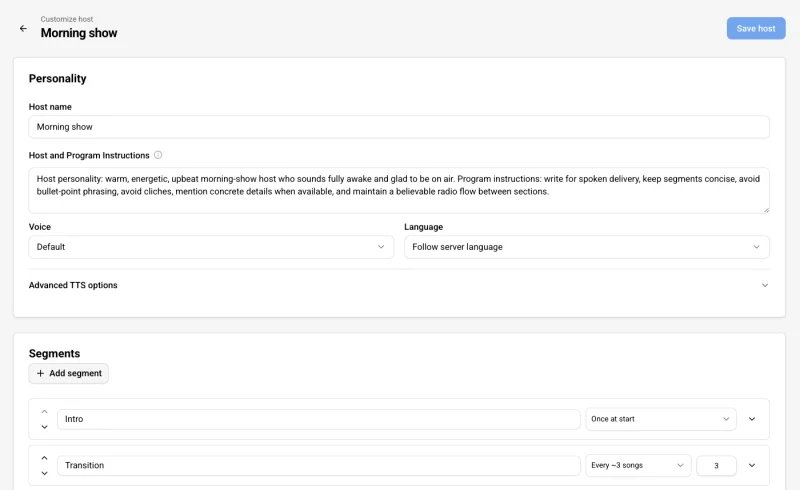
The DJ that never sleeps 🎙️
Remember the golden age of radio, when a DJ introduced every track, gave you the weather, and kept you company on the drive home? It’s back – and this time, the DJ lives on your server. With the new AI Radio DJ plugin by @swiftbird07, Music Assistant combines LLMs and text-to-speech to turn any playlist into a real radio station.
You define your own station: song intros and outros, weather reports, news bulletins – it’s all configurable, right down to how often a segment appears between songs. Pre-build a whole station ahead of time, or let it generate each segment as you go for whatever’s in your queue.
“You Ain’t Seen Nothing Yet”
Section titled ““You Ain’t Seen Nothing Yet””The hits just keep on coming
Here’s a rundown of everything else in 2.10:
New music sources
- Pocket casts: sync your podcast subscriptions (by @yfhyou)
- Overcast: your Overcast podcasts in MA (by @OzGav)
- Storytel: stream your Storytel audiobooks (by @jonasbp2011)
- Sveriges Radio: tune into Swedish public radio (by @romany)
- ABC Radio Network: listen to Australian radio stations (by @OzGav)
- Mamma Mi Radio: hand-curated eclectic internet radio (by @florianhorner)
- Google Drive: stream your cloud music library (by @OzGav)
- OneDrive: play music from Microsoft OneDrive (by @OzGav)
- Ambient sounds: locally generated noise loops (by @marcelveldt)
- Rainy mood: relax with soothing rain sounds (by @jlpouffier)
- teddycloud: connect your Toniebox via teddycloud (by @yoyixms)
New player support
- Bose SoundTouch: control your SoundTouch speakers (by @Odn0)
- Yandex Station: local control of Yandex speakers (by @trudenboy)
- AmpliPi: multi-zone whole-house audio support (by @mcaulifn)
Other new features
- Cast dashboards: some pages, such as the now playing screen and the party dashboard can be cast as dashboards (by @MarvinSchenkel)
- Guided setup flows: step-by-step provider and player setup (by @marcelveldt)
- Smarter Smart Fades: vocal and energy aware transitions (by @MarvinSchenkel)
- Milkdrop visualizer: great visuals for your music (by @jozefKruszynski)
- Sleep timers: doze off, playback stops automatically (by @teancom)
- Audiobook collections: organize series into tidy collections (by @fmunkes)
- Audible Whispersync: resume audiobooks across your devices (by @scootaash)
- Birthday recommendations: celebrate artists born this day (by @dmoo500)
- Playlist artwork: auto-generated covers for your playlists (by @dmoo500)
Want the full list? Head over to the release notes for everything that’s new 👀
“The Show Must Go On”
Section titled ““The Show Must Go On””See you at the next gig
Music Assistant 2.10 brings queue improvements, Smart Shuffle, game mode, and more into play – all ready for your next listening session. New around here? Our getting started guide will have you up and running in no time.
As always, releases run on a three-month cadence, and the next one is already in the works. For a look backstage, join our beta channel to test new features as we build them, or share your ideas on the feature requests page. And if you just want to say hi, head over to Discord – our door’s always open.
Finally, no gig is complete without swinging by the merch table on your way out. The Open Home Foundation store just dropped new T-shirts featuring Music Assistant, ESPHome, and a fresh Home Assistant design, all in classic black. They are versatile, built to last, and best of all, every purchase helps fund the foundation’s work. Grab yours from the store to wear your support!