

Ambient Sounds 
Section titled “Ambient Sounds ”Music Assistant has support for Ambient Sounds. This component is contributed and maintained by the Music Assistant core team.
This source gives Music Assistant users a small catalog of ambient sound loops, white, pink and brown noise plus ocean waves, that are generated locally on the server. They can be played directly like any other item, or used as the source for the queue audio overlay feature to mix a bed of ambient sound underneath the music.
Features
Section titled “Features”| Subscription FREE | Yes |
| Self-Hosted Local Media | No |
| Media Types Supported | Sound Effects |
| Recommendations Supported | No |
| Lyrics Supported | No |
| Endless Mix | No |
| Artist Top Tracks Support | No |
| Similar Artists Support | No |
| Similar Tracks Support | No |
| Maximum Stream Quality | FLAC 44.1kHz 16 bit |
| Login Method | None |
Included sounds
Section titled “Included sounds”| Sound | Description |
|---|---|
| White noise | Bright, steady hiss with equal energy across all frequencies |
| Pink noise | Softer noise with reduced high frequencies, similar to steady rainfall |
| Brown noise | Deep, low rumble similar to a distant waterfall or heavy surf |
| Ocean waves | Deep rolling noise with a slow, wave-like swell |
- Every sound is a 30 second loop that is built to repeat seamlessly, so it can play indefinitely without audible seams
- All sounds are calibrated to the same loudness (-14 LUFS), so switching between them does not change the perceived volume
- Can be used as the audio overlay source for a queue, mixing ambient sound underneath the music
Configuration:
Section titled “Configuration:”- The provider is set up automatically and there is nothing to configure.
- The provider can be disabled or removed from Settings → Music Sources.
The ambient sounds are not added to the library and do not show up in search. They can be found by browsing:
- Go to Browse in the main menu
- Open Ambient Sounds
From there a sound can be played directly on any player, just like a track.
Using ambient sounds as audio overlay
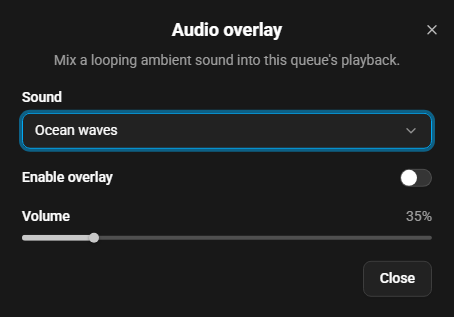
Section titled “Using ambient sounds as audio overlay”The audio overlay mixes a looping sound effect into the audio of a queue while the music keeps playing. It is enabled by an option in the settings of the Now Playing view. Pick one of the ambient sounds as the overlay source for a queue and set the overlay volume (relative to the music) to taste. Changes take effect immediately. When the queue is playing, playback restarts from the current position so the change is heard right away instead of after the player’s buffer has drained.
Note that enabling the overlay forces the queue into flow mode, because the overlay has to keep playing across track boundaries.
Known Issues / Notes
Section titled “Known Issues / Notes”- These are synthesized sounds, not real field recordings. For naturalistic content such as real rain recordings, use a dedicated provider
- The first time a sound is played it is rendered with ffmpeg, which can take a few seconds. The result is stored in Music Assistant’s cache directory (a few MB per sound) and reused from then on, so subsequent plays start immediately
- Removing the cache directory is harmless — the sounds are simply rendered again on next use
- Ambient sounds cannot be favourited or added to a playlist
- While the audio overlay is active, the queue always plays in flow mode. Players that rely on per-item playback features will behave accordingly
- If the overlay source cannot be resolved or its stream fails, playback continues without the overlay rather than stopping the music
This website uses privacy-first analytics to help us improve the site. You can view all data in our public dashboard.