

Nico Nico 
Section titled “Nico Nico ”Music Assistant has support for Nico Nico Video, a Japanese video-sharing website similar to YouTube, famous for its on-screen scrolling comments that overlay the video. Contributed and maintained by 柴田 Shi-553
Much of what is on Nico Nico is uploaded by its own community, so it holds a lot of original songs, remixes and Vocaloid work that never reaches the larger streaming services.
This source lets you search that catalogue and play the audio through Music Assistant. Sign in and the Mylists you have made and the artists you follow come across as well.
Features
Section titled “Features”| Subscription FREE | Yes |
| Self-Hosted Local Media | No |
| Media Types Supported | Artists, Albums, Tracks, Playlists |
| Recommendations Supported | Yes |
| Lyrics Supported | No |
| Endless Mix | Yes |
| Artist Top Tracks Support | Yes |
| Similar Artists Support | No |
| Similar Tracks Support | Yes |
| Maximum Stream Quality | AAC up to 576kbps |
| Login Method | Cookie |
- Allows searching, playback, and library integration
- Keyword search for Tracks, Playlists (Mylist), and Albums (Series)
- Recommendations based on history and follow activity
- Library support
- Playlists: your own Mylist (read/write)
- Artists: your following artists
Configuration
Section titled “Configuration”Music Assistant supports login-free playback and search on Niconico. Logging in enables personal features such as recommendations, Mylist read/write, and watch history.
Login uses your Niconico user_session cookie. Email and password login is no longer supported, because Niconico now requires a verification step for it.
Cookie Authentication (user_session)
Section titled “Cookie Authentication (user_session)”Written for Chrome:
- Navigate to https://www.nicovideo.jp/
- Go to View > Developer > Developer Tools. A new side window will open.
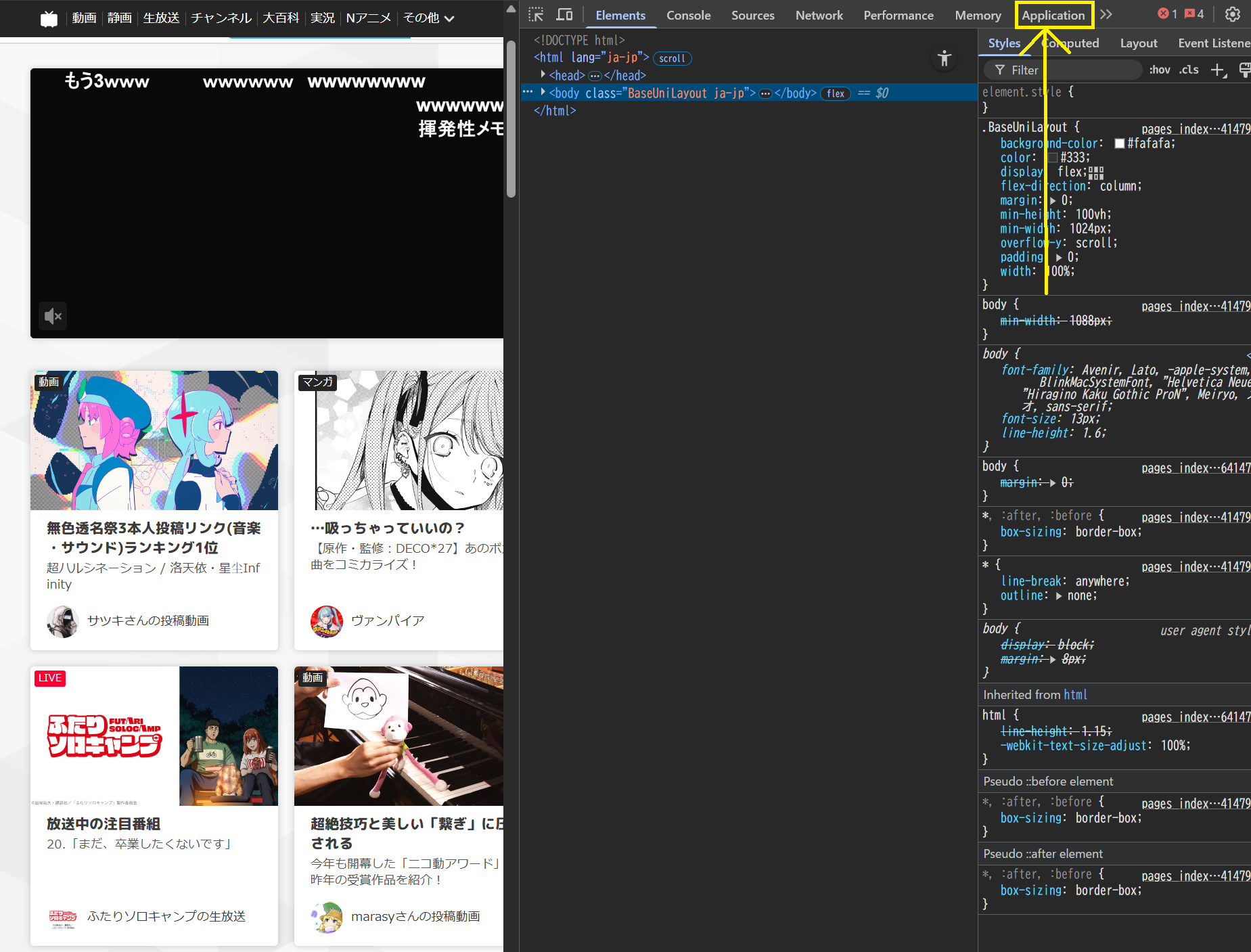
- Click the ‘Application’ tab. You might need to expand your window or click the >> button
- Under Storage > Cookies, click “https://www.nicovideo.jp” and find the entry called “user_session”
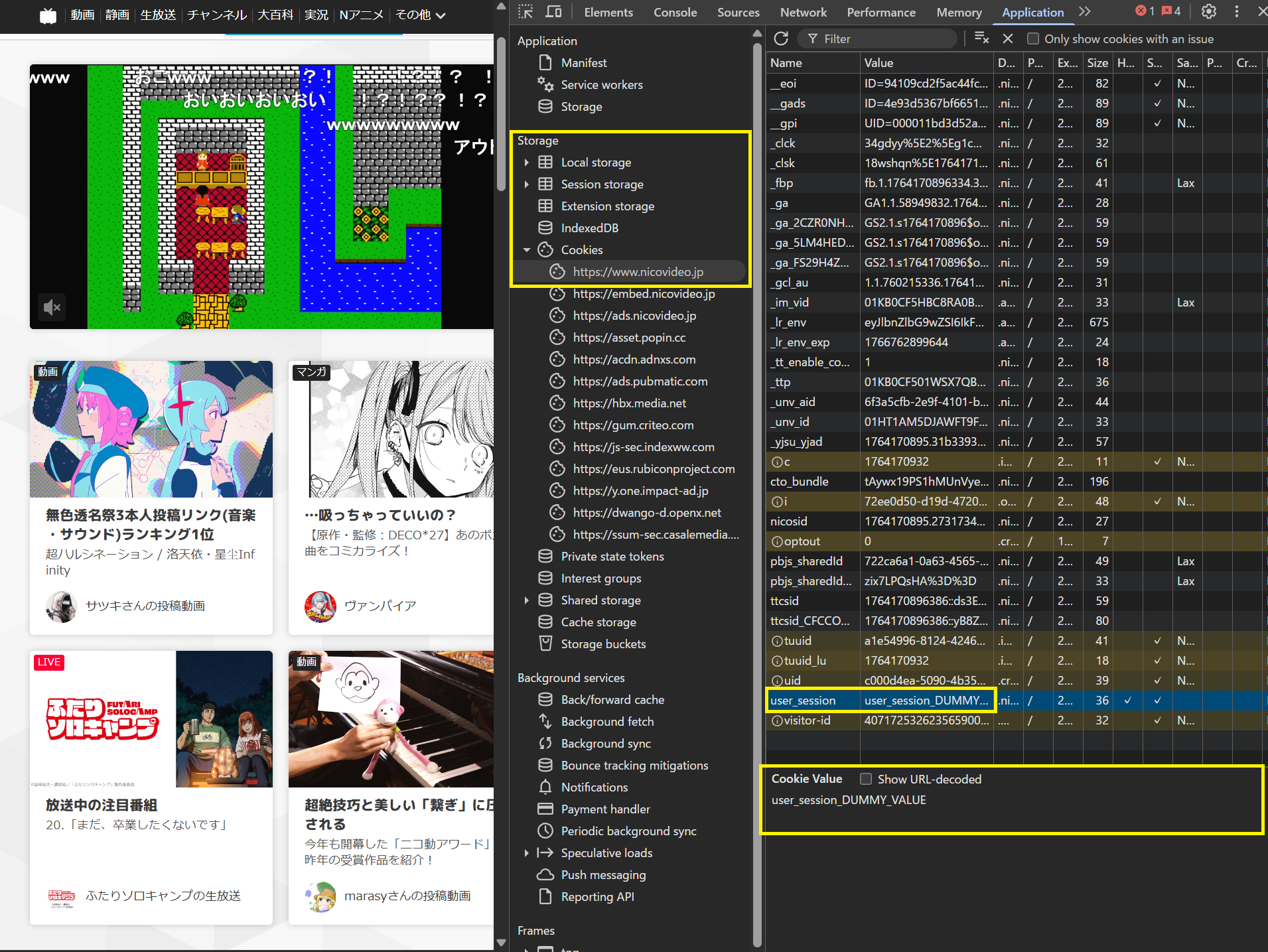
- Click it and copy the cookie value and use this in Music Assistant as the ‘User Session’
- Take note of the “Expires / Max-Age” column. The session will expire on that date and is not renewed automatically. Music Assistant will then report that the cookie is invalid or has expired, and personal features will be unavailable until you repeat the above process and enter the new
user_sessionvalue in the provider settings
- Take note of the “Expires / Max-Age” column. The session will expire on that date and is not renewed automatically. Music Assistant will then report that the cookie is invalid or has expired, and personal features will be unavailable until you repeat the above process and enter the new
Known Issues / Notes
Section titled “Known Issues / Notes”- If you assign an album to a track, the track-specific thumbnail will not be used
Not yet supported
Section titled “Not yet supported”- Nil
This website uses privacy-first analytics to help us improve the site. You can view all data in our public dashboard.